


|
|
|
|
|
Click on Advanced to see some more advanced options for your sign-on:
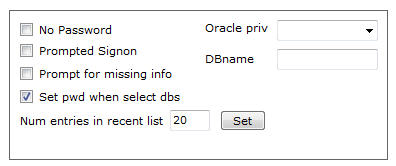
If your user-id has no password you can’t just leave the password field blank; if you did AQT will assume you are doing an integrated log-on and pass neither the user-id nor password in the sign-on request. Check No Password - AQT will then sign-on specifying the user-id but not the password.
If you are having problems signing on, or if you need to enter some database-specific parameters, you should do a Prompted Sign-on. Prompted Sign-on invokes the log-on system supplied by the database vendor, giving you better control of the sign-on process.
If you need to specify additional information for a connection, check Prompt for Missing Info. You would use this if you have configured an ODBC Datasource that hasn't specified the complete information needed to connect (some people use this as a way of configuring a Generic connection).
By default, when you click on a database in the Database list, AQT will see if the database is one for which it has saved the userid/password. These databases appear in the Recent list. If so, the userid and (if saved) the password are populated in the Userid / Password boxes.
If you de-select this option, AQT will not retrieve the userid/password. Instead the fields will remain unchanged. This can be useful if you have a lot of databases with the same userid and password.
This specifies the number of entries AQT is to save in the Recent Connections list. You can specify a value between 1 and 100.
A high value has a (slight) impact on performance as AQT saves the Recent Connections list every time you sign onto a database.
For SQL Server, Sybase Enterprise, MySQL and Informix you can specify which database you want to sign on to. By default, you sign on to the database specified in your profile.
When signing onto Oracle, you can specify that you are signing on with sysdba or sysoper privileges.
This feature is only available if you are using v9.2 or higher of the Oracle ODBC Driver. If your ODBC Driver does not support this syntax, you will get the message: invalid username/password
