Database Connections & Setups
Signing on to a Database
When you start AQT the Database Signon window will be displayed.
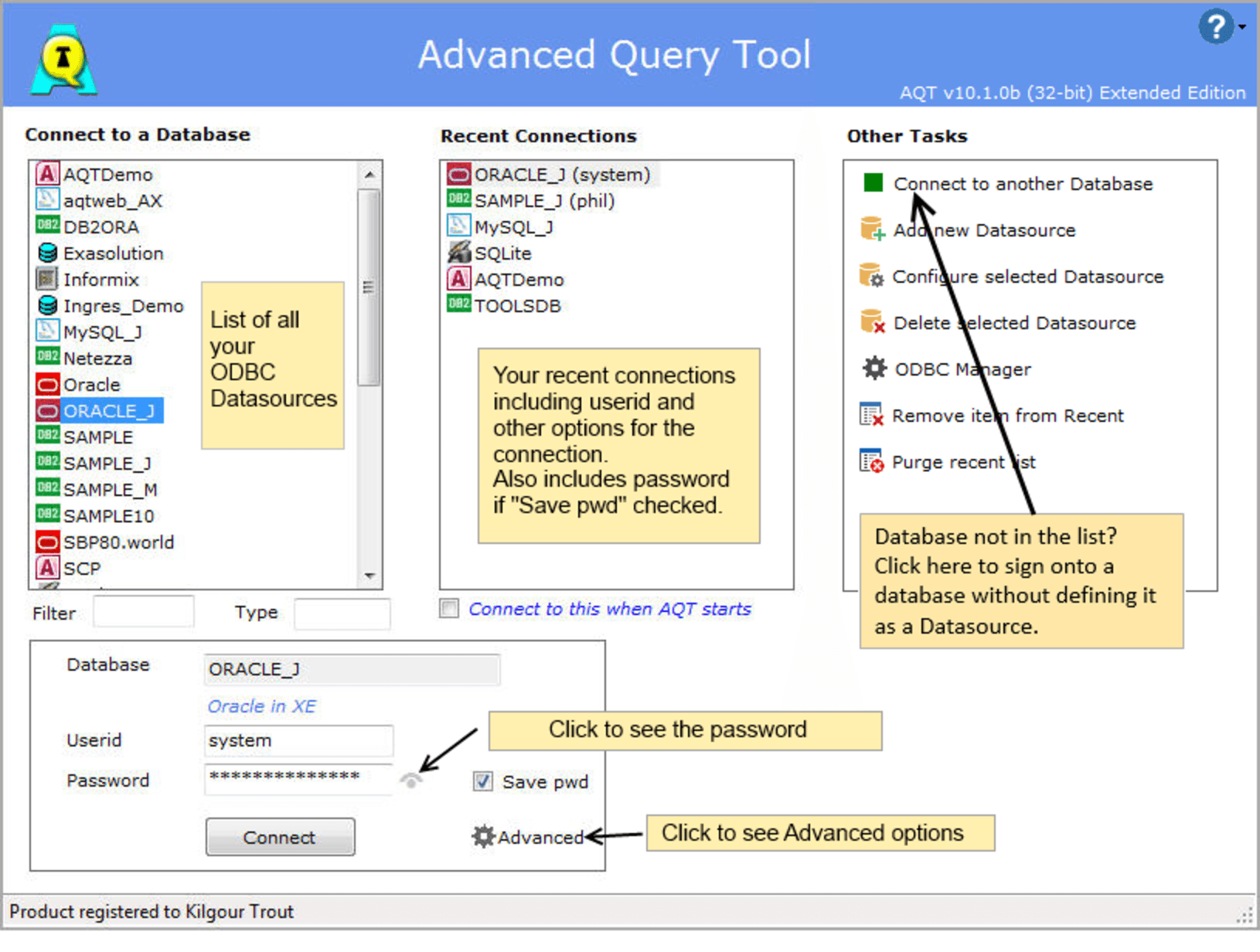
In the left panel, a list of all your ODBC Data Sources will be displayed.
click on the database you want to sign on to
enter a userid and password for database (if required)
click Connect
you will be signed onto your database and the Database Explorer window displayed.
Database not in this list?
There are two reasons why your database may not be in this list:
it has not been set up as an ODBC Datasource
you are running the 32-bit edition of AQT and your ODBC Driver is 64-bit (or vica-versa). You need to be running the same architecture of AQT as your ODBC Driver. See Installing AQT on 64-bit version of windows for a discussion on this.
Setting up a new Datasource
If your database is not in the list of Datasources, you will need to add it as an ODBC database.
You can do this by clicking on the Add new Datasource button in the Other Tasks panel.
For more details on how to do this. see also Configuring a Database Connection.
Signing onto a Database without setting up a Datasource
If you want to sign onto a database without first setting up a datasource, click on Connect to another Database. For some databases (DB2, Oracle, SQL Server, MySQL, Access and Excel) you will be shown some dialogs to help you sign onto these databases.
You will be required to specify some technical information about the connection so this is not a good option for novices.
Recent Connections
The Recent Connections list shows you the databases you have recently connected to.
The userid and (optionally) the password are remembered as part of this. The userid is shown in brackets after the database name. If you sign onto a database with a number of different userids, you may see more than one entry in this list for the database.
To sign onto a Recent Connection:
select an entry from the list
the database, userid and (if saved) the password will be populated in the boxes at the bottom
if there are any Advanced options associated with the connection, these will also be shown
click Connect
The number of entries held in the Recent Connections list is specified in Advanced Options.
Having AQT remember your Userid and Password
AQT saves your userid as part of the information it holds about your Recent signons. It will also hold your password, if the Save pwd option has been checked.
When you select a database from the Recent list, the userid and (if saved) the password will be populated in the Userid and Password boxes.If a database is selected from the Database list, the userid/password will be populated if the database is one which also appears in the Recent list.
When you save the password, it will be held in an encrypted form in the Windows registry. This is encrypted using a strong encryption method, AES 256 bit encryption. However we cannot guarantee that this cannot be cracked. There are various methods whereby the password can be compromised. If your data is sensitive or critical then we recommend that you do not use the Save pwd option.
System administrators can prevent users from using this options by setting Options > User Rights > Disable Save Password on Signon window.
As of AQT v10.1.1, a new method is used for encrypting passwords. If you are running multiple versions of AQT, passwords saved by AQT v10.1.1 or later releases cannot be used by earlier releases.
Auto Signon when AQT starts
You can specify that AQT auto-connects to a database when it starts. To do this, select a connection from the Recent list and check the Connect to this when AQT starts option.
Signing Onto Multiple Database
You can sign onto multiple databases by selecting multiple entries from either the Database or Recent lists (using Ctrl or Shift).
If your database requires a userid and password, the signon will only be successful if AQT has remembered the userid/password for that database - eg. the database is one that appears in the Recent list plus the Save Pwd option has been checked.
Other Comments
if you are unsure what userid or password to use, see Database User-ids and Passwords for some discussion on this.
click on Advanced to see some Advanced Sign-on options.
if you have a lot of Datasources, you can use the Filter and Type boxes to filter entries in the list.
when a Filter is entered, AQT will only show the Datasources that contain this value
when a Type is entered, AQT will only show Datasources whose ODBC Drivername contains this value. Examples of what you can enter here - DB2, Oracle
Database User-id and Password
How AQT uses User-ids and Passwords
When you sign onto a database, if either the User-id or Password fields are blank, AQT will sign-on without specifying either the user-id/password.
If you need to sign-on on with a user-id which has no password (only Sybase and SQL Server allow this), enter a user-id and check Advanced > No Password.
What User-id and Password?
You may be unsure about what user-id and password to use for your signon.
This is a surprisingly non-trivial issue; it depends on what database you are accessing, where it is located and how it has been configured.
As a generalization:
for Oracle, Sybase and SQL Server, it is the user-id and password with which you have been defined to the database. The user-id may be the same as your Unix/LAN user-id, but the password will be the one you have been set up in the database with.
for DB2, it is the user-id and password valid for the machine where the database resides (DB2 links into the security system of the operating system on which it is running). In other words, use your normal z/OS / Unix / NT user-id and password.
If you are in doubt about which user-id/password to use, contact your friendly Database Administrator, or if you don’t have one, any Database Administrator.
Client Security / Integrated Logon
Some databases do not require you to sign on; instead the database uses the security system of your PC. With this method, the database assumes that your identity (eg. user-id and password) has been authenticated by your client (which may be NT/2000/XP) or LAN server. When this is in effect, you do not need to supply a user-id and password.
This is known by various descriptions, depending on the database type:
Description | Database type |
|---|---|
Client Security | DB2 |
Integrated Logon | Sybase |
NT Authentication | MS SQL Server |
OS Authentication | Oracle |
Whether these methods are used with your database will depend on your database type and how it has been configured. To find out whether it is used, contact your DBA.
To use client security with Advanced Query Tool, leave the password field blank. AQT will sign on specifying neither user-id nor password.
If this succeeds you will be signed on to the database with the same user-id you are signed onto your PC or LAN with (not the one in the user-id field on the Signon window).
What ID are you to the database?
As a further complication, for some databases the ID you are known to the database may be different to the ID you signed on with (some databases map IDs from external IDs to internal IDs). To see what ID the database knows you as, see Help > Database Details > User Name from the Database Explorer window.
Database Sign-on problems
If you are having problems signing on, or if you need to enter some database-specific parameters, you should do a Prompted Sign-on. Prompted Sign-on invokes the log-on system supplied by the database vendor, giving you better control of the sign-on process.
Advanced Sign-on options
Click on Advanced to see some more advanced options for your sign-on:
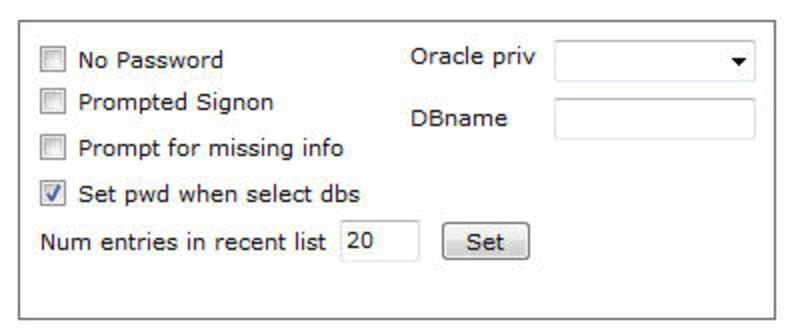
No Password
If your user-id has no password you can’t just leave the password field blank; if you did AQT will assume you are doing an integrated log-on and pass neither the user-id nor password in the sign-on request. Check No Password - AQT will then sign-on specifying the user-id but not the password.
Prompted Sign-on
If you are having problems signing on, or if you need to enter some database-specific parameters, you should do a Prompted Sign-on. Prompted Sign-on invokes the log-on system supplied by the database vendor, giving you better control of the sign-on process.
Prompt for missing info
If you need to specify additional information for a connection, check Prompt for Missing Info. You would use this if you have configured an ODBC Datasource that hasn't specified the complete information needed to connect (some people use this as a way of configuring a Generic connection).
Set pwd when select dbs
By default, when you click on a database in the Database list, AQT will see if the database is one for which it has saved the userid/password. These databases appear in the Recent list. If so, the userid and (if saved) the password are populated in the Userid / Password boxes.
If you de-select this option, AQT will not retrieve the userid/password. Instead the fields will remain unchanged. This can be useful if you have a lot of databases with the same userid and password.
Number of entries in recent list
This specifies the number of entries AQT is to save in the Recent Connections list. You can specify a value between 1 and 100.
A high value has a (slight) impact on performance as AQT saves the Recent Connections list every time you sign onto a database.
Database Name
For SQL Server, Sybase Enterprise, MySQL and Informix you can specify which database you want to sign on to. By default, you sign on to the database specified in your profile.
Oracle Privileges
When signing onto Oracle, you can specify that you are signing on with sysdba or sysoper privileges.
This feature is only available if you are using v9.2 or higher of the Oracle ODBC Driver. If your ODBC Driver does not support this syntax, you will get the message: invalid username/password
Adding a Description to your Recent entries
Your can add a description to your Recent entries. This allows you to give a more meaningful name to your database names.
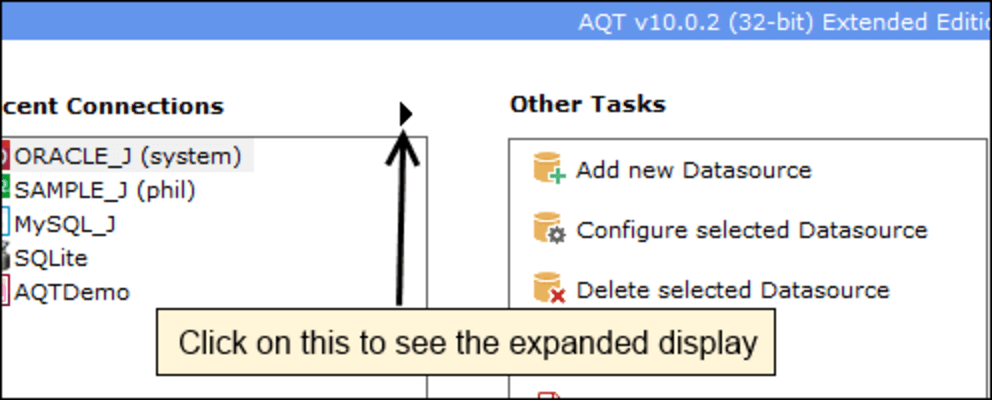
By default, the description is not shown. To see the expanded display with the description, click on the right-arrow at the top right of the Recent list.
The Signon window will now appear with an expanded Recent display. This will show you both the Database name and Description for the recent entries.
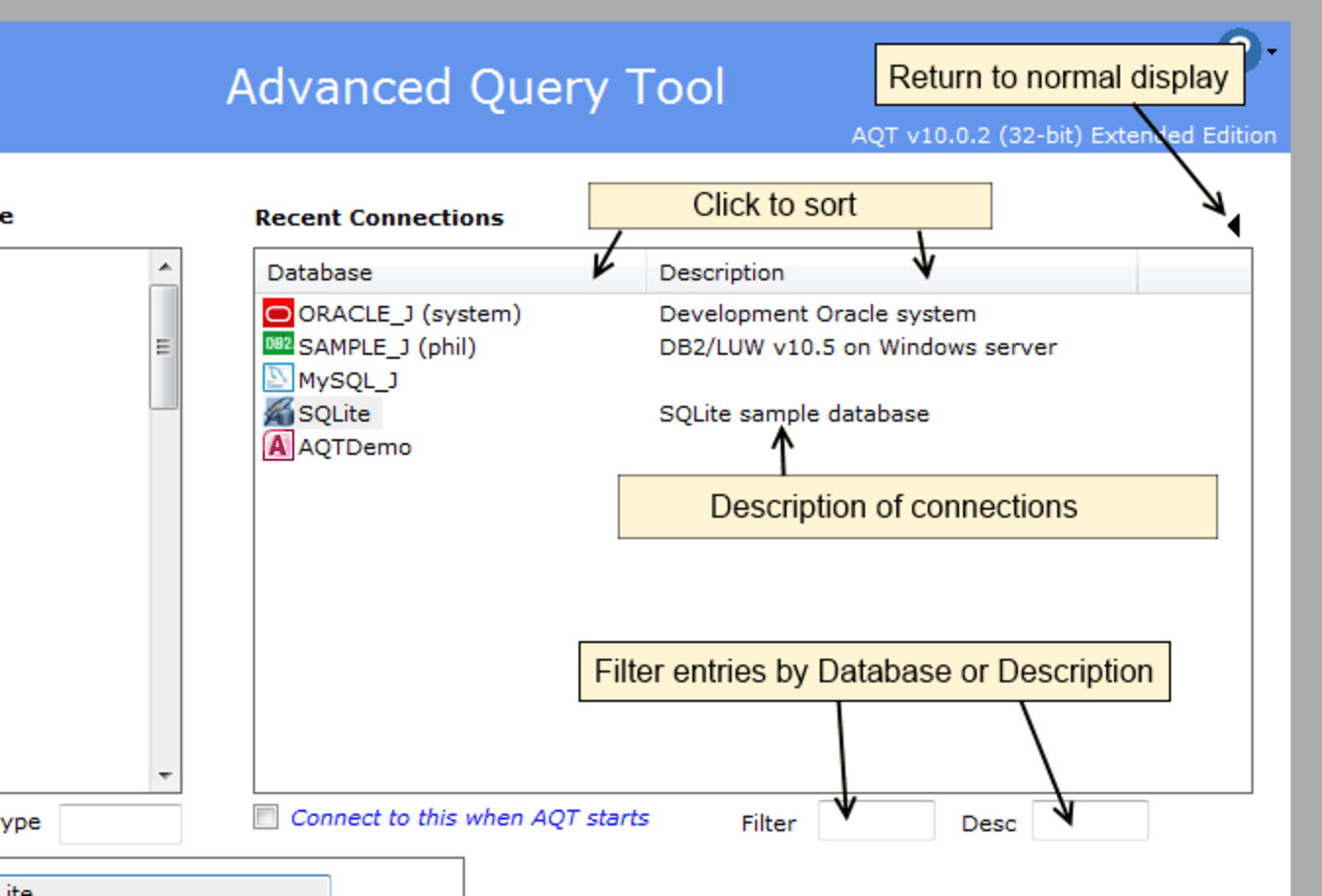
you can add a description by right-clicking a database and selecting Add Description
you can remove a description by right-clicking a database and selecting Remove Description
you can sort the list by either Database or Description by clicking on the column headers
you can filter the lists by either Database or Description with the filter boxes underneath the recent list
Managing your ODBC Datasources
On the right side of the Sign-on window are a number of buttons for managing your ODBC Datasources.
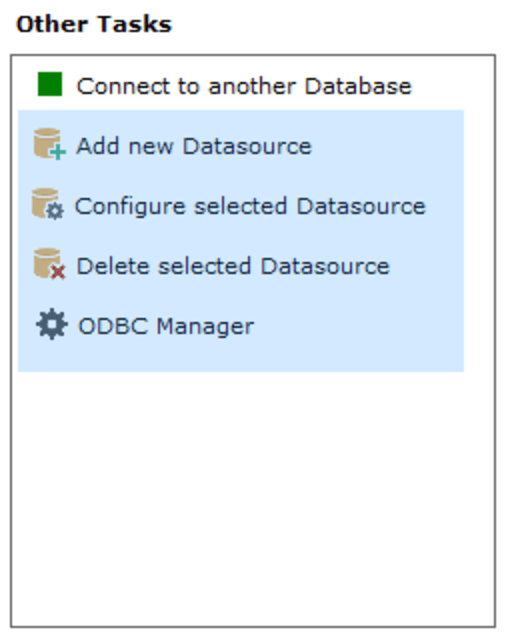
use Add New Datasource to create a new Datasource.
use Configure selected Datasource to change the way a Datasource has been configured
use Delete selected Datasource to delete the Datasource
use ODBC Manager to invoke the Microsoft ODBC Administrator system
These ODBC Admin functions can be hidden with Options > User Rights > Hide ODBC Admin functions on Signon window.
User versus System Datasources
Note that your ODBC Datasources are in two categories:
User Datasources. These can only be used by yourself
System Datasources. These can be used by any user on your PC.
You can only create / configure / delete System Datasources if you have sufficient rights on your PC. Info on these datasources is info is held in the LOCAL_MACHINE part of the registry which, by default, you will not be able to alter.
For more information on configuring your ODBC Datasources, see Configuring a Database Connection.
Connection Problems
If you are unable to get past the sign-on window then you are having problems with the database connection. If you are lucky you might get an informative error message, however this is often not the case. Non-technical users of AQT should contact their Database support team.
Many things can cause connection problems, most of which are outside the control of AQT:
The ODBC datasource is not configured correctly or the database does not exist.
The database is not started or cannot be accessed due to a communications problem.
The user-id and/or password are not valid.
For information on how to configure a connection to your database, see Configuring a Database Connection.
Signing onto a database is a surprisingly complicated subject – see More info on Database Sign-on for a fuller explanation.
Try the following actions if you encounter connection problems:
Try connecting from ODBC Setup
This will tell you whether it is a problem with the ODBC connection, or a problem with AQT.
Many ODBC Setup drivers have a “Test Connection” option which is very useful (get into this by selecting the database and hitting Configure).
Try connecting from another product
Alternatively, try accessing your database from a product such as MS Access (File > Get External Data > Link Tables. Select Files of type > ODBC Databases. Select tab Machine Data Source then select your database. [What a lot of work just to sign onto a database. :) ]
Prompted Sign-on
One thing you can try is a Prompted Sign-on. Select this by setting Advanced > Prompted Sign-on. In this mode the ODBC driver will prompt you for connection information. This gives you better control of seeing and specifying any particular connection parameters.
Prompt for Missing Info
This is like Prompted Sign-on but only prompts you for connection parameters that are not currently present. In many cases this is a more suitable option than Prompted Sign-on.
User-id has No Password
If your user-id has no password you can’t just leave the password field blank; AQT will assume you are doing an “integrated logon” and specify neither the user-id nor password in the sign-on request.
In this case you need to check Advanced > No Password.
“Error Requesting Parameters”
You may get a message such as “error requesting parameters required to complete a connection”. If you get this then you haven’t specified enough information in your ODBC configuration:
for MS SQL Server and Sybase you can get this if you have specified the name of the machine to connect to, but not the database name (eg. master).
for MS Access you get this if you did not specify the name of the mdb file.
In both cases, select the database and hit Configure. Correct the settings.
Alternatively you can specify the Database when you log on. Select Advanced and fill out the DBName box.
IM026
DB2 users will get this if the c:\sqllib\bin directory has not been set in their PATH. The DB2 client install (for some releases) fails to do this.
System Hangs with message “Loading Schema Information”
If you are a DB2 user and you get this, the probable cause is that the “ODBC packages have not been bound against the database”. This may not mean much to you, but it should to your DBA. If you are the DBA then you can bind these by
going into the Client Configuration
selecting the database
clicking on Bind
selecting Bind Db2 Utilities.
Connecting to Oracle
If you are having problems connecting to Oracle see Oracle - Diagnosing Connection Problems
More info on database sign-on
Scripting
You can Script a database sign-on. This is mainly designed for use with Batch Mode operation of AQT. However, in normal AQT operation you can run a script with a number of Connect functions. This can be used to sign on automatically to a number of databases without having to go through the sign-on dialog. Scripting > Connect function gives more information on this.
You can automatically connect to a database when AQT starts by clicking on the database in the Recent list then selecting the Connect to this when AQT starts option.
Reconnecting
Within the Database Explorer there is an option File > Reconnect to Database. This will disconnect you from your current session with the database, and reconnect you to it. This option is useful if your database session has timed out or been disconnected for some other reason. The Reconnect option allows you to quickly re-establish the database connection.
AQT also has the ability to auto-reconnect to a database when it has detected that the connection has been closed. This option is configured on Options > Technical Parameters.
Registry entries for Datasources
Information on your Datasources is held in the Windows Registry under key Software\ODBC\ODBC.INI. For System Datasources these are in HKEY_LOCAL_MACHINE, for User Datasources these are in HKEY_CURRENT_USER.
While it is not recommended practice, it is possible to manipulate these entries using Regedit. An example would be copying a set of entries from one machine to another. This will only work if the relevant ODBC Drivers have been installed on the target machine, and the database client has been installed and configured.
Changing your Password
AQT has no ability to change your password, as there is no way of doing this through the ODBC interface.
However, some ODBC Drivers provide this function as part of their sign-on dialog. To do this, from the AQT Sign-on window, click on Advanced then check Prompted Signon. The subsequent dialog may offer the ability to change the password.
for DB2 you can also change your password by using the DB2 Configuration Assistant. Start this, select the requried database then click on Selected > Change Password.
the Oracle ODBC Driver only offers you the ability to change your password once you receive the Password Expired message (ORA-28001).
Connecting to a database when AQT starts
You can automatically connect to a database when AQT starts.
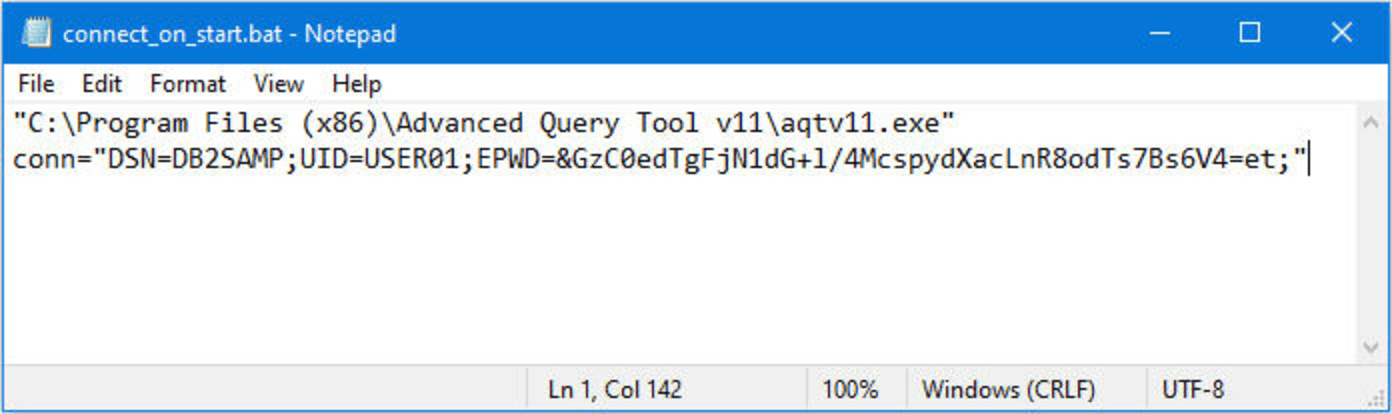
This is done by specifying the conn startup parameter. This is discussed in the section Startup Command Arguments.
The following is an example of a batch script to start AQT and connect to a database. The command used in this script can also be used in a desktop icon to start AQT with connect.
Notes:
this entire command is on one line (hard to see this with Notepad!)
this is an example of using an encrypted password (EPWD)
You can also achieve this functionality by starting AQT with a particular session.