Configuration & Settings
Expert-only Options
CAUTION: Changing these settings may strongly affect the performance of Advanced Query Tool or your database. It is strongly recommended that only users who are experienced in database performance make any changes to these settings.
Database Explorer
These options govern how AQT obtains the information on tables (and other objects) in your system. If AQT is unable to correctly display the tables in your system you could try changing some of these parameters, otherwise they should not be changed.
Get Table Info from
This determines whether table information is obtained from the System Tables or from the ODBC API calls. The default is System Tables (if that option is available for this database).
This parameter cannot be changed while you are currently signed onto a database.
For a further discussion on this see System-Table Query Feature.
Show Favorites on Startup
If this option is selected, AQT will show the Favorites display when it opens the Database Explorer window.
If the database does not have any favorites defined, AQT will show the Objects display.
For DB2 for iSeries, support the *SYS Naming Convention
For DB2 for iSeries, table names can be referenced using schema/table-name, rather than schema.table_name. Example:
select * from QSYS2/SYSTABLES
This is known as the *SYS Naming Convention. You may wish to adopt this standard if you are running scripts that refer to tables using this convention.
If so, you need to:
when you configure your ODBC Datasource, on the Server tab specify a Naming Convention of System naming convention (*SYS). This option is only available when using Client Access Express, and not if you are using DB2/Connect.
on AQT Options, set the option For DB2 for iSeries, support the *SYS Naming Convention option
Number of items in History Cache
This specifies the number of entries in the object-list cache in the Database Explorer. Specify 0 to disable this feature. This value applies to each Database Explorer window, as each Database Explorer window has it's own cache.
The cache is held in memory; the larger this value, the more memory will be used by AQT. You should avoid specifying an unnecessarily high value.
If this value is changed, it won't come into effect until the next time you connect to a database.
History Cache will not be used if Disk Cache is enabled.
Get Related Table information from User Defined Relationships only
When using the Query Builder or the Link to Related Table feature of AQT, AQT needs to find information on table relationships. It get this from two places:
from the database (eg. foreign key relationships)
If you do not have any relationships defined to the database, the database query is superfluous and adds unnecessary overhead to AQT. In this case, you may wish to select this option. When this is done, AQT will not query the database for foreign key relationships - it will get related table information from UDRs only.
Only show filtered objects when invoke a sub-window
This option relates to a problem which occurs when you have a large number of objects in the object-list, plus a filter applied so that only a small number of these rows are displayed.
In this circumstances, AQT can be very slow to load the Generate DDL window, the Add Multiple Objects to Favorites window, and (in some cases) the Manage Multiple Objects (such as Drop Table) The slow time is because AQT is loading all the objects into the grid on these windows, then reapplying the filter.
If you are experiencing this problem, you should select this option. In this case, AQT will only load into these windows the objects which are displayed in the object-list. These windows will load much faster. The drawback is that the filter-box on these windows will be disabled; if you wish to have a different filter you will need to return to the Database Explorer window, change the filter, then reinvoke the sub-window.
For Oracle, use DBA dictionary views
This option determines which set of Oracle dictionary views AQT is to use to display the information in the Database Explorer. This takes values:
No. AQT will use the ALL views
Yes. AQT will use the DBA views
Auto. AQT will run a query to determine whether you have access to the DBA views. If so, AQT will use the DBA views, if not, the ALL views
This option comes into effect immediately so can be changed during the course of an AQT session, though you may have to Refresh the middle grid and/or the Object Tree if they contain cached information.
There is more on this at Notes on Database Explorer for Oracle
Remember schema filters between sessions
When this option is selected, AQT will remember the schema filters between AQT sessions.
Disk Cache
When the Disk Cache is enabled, AQT will cache the Database Explorer displays to disk. This is similar to the History Cache (see above), however has a number of advantages:
History Cache stores the data in memory, resulting in more memory usage. By contrast Disk Cache stores the data on disk.
History Cache will lose the cache when AQT is closed. Disk Cache will retain the cached data between AQT sessions.
With Disk Cache you can select whether you want this feature enabled for Schema lists, Objects lists or both.
If your system has a large number of database objects, enabling Disk Cache will result in a faster startup once you connect to a database.
Specify the following options:
Use Disk Cache for Schemas - when this is selected, AQT will use the Disk Cache for the list of schemas. These are used when you click on an object-type in the Object Tree on the left panel.
Use Disk Cache for Objects- when this is selected, AQT will use the Disk Cache for the list of objects. These are displayed in the Object List in the middle panel.
Max cache files per database. This specifies how many files are to be held in the Disk Cache. This applies separately to Schema and Object caches - for instance if you have a value if 10, AQT will hold 10 schema cache files and 10 object cache files.
The directory cache files are held in is given in Options > File Locations
Database Explorer Appearance
These options govern the appearance of the Database Explorer window.
Grid Styles
These give the styles to be used for the grids in the Database Explorer window. Styles are explained in more detail in the section Grid Styles.
select a style from the drop-down list of styles. The drop-down list will show you all the in-built styles, plus the user-defined styles which are in the default directory.
click on Load from File to use a user-defined style which in another directory on your PC.
click on Edit Grid Styles to start the Style Editor, in which you can view the definition of the grid styles, plus create or amend user-defined styles.
There are four styles designed for use by the Database Explorer grids:
DB1 | Plain |
DB2 | Two color |
DB3 | Gridlines |
DB4 | Two color plus gridlines |
By default, the grids will use style DB1.
Grid Options
Header Color gives the color of the title-bar above the grids. Click on Back / Fore to select the background and foreground colors respectively.
Font Name gives the font to be used by grids. This overrides the font defined as part of the grid style.
Row Height. This gives the height of the rows in the grid. By default this is 20.
Revert to Defaults will set these options back to their default values.
Explain Plan
IDMS Options
These specify the name of the ACCESS_PLAN and ACCESS_CODE tables. These must exist before the Explain feature for IDMS will work.
Clicking on Create will create these tables with the names specified.
DB2
Query number. This specifies the query number used for the explain.
If multiple people are sharing the same plan_table, it is recommended that they all use a different query number. If this is not done, the users will be able to see (and delete!) other people's explain results.
Plan table schema for DB2 z/OS. This specifies the schema name of the PLAN_TABLE containing the explain results.
If you leave this blank, AQT will use your own userid.
This option only determines which schema will be used when displaying the explain results. For the explain results to go into schema different than your own userid, you will need to run the command set current sqlid='xxxx' prior to running the explain. AQT will not do this for you.
Run Explain under Plan table Schema. When this option is selected, AQT will change the session SQLID to the value of Plan table schema for DB2 z/OS before running the explain. This will ensure that the explain information is written to the explain tables in the Plan table schema.
After the explain has been done, the SQLID is set back to the user's userid.
Use Visual Explain for DB2 z/OS. This specifies whether the DB2 z/OS explain results will be displayed using Visual Explain.
Configuration of this feature has not been completed, so use with caution for DB2 z/OS.
Cancel Queries
This option specifies whether long-running queries are able to be cancelled.
To understand this, you should realize that queries are run in two phases:
running the query on the server
fetching the results
If you are running a delete or update, only the first of these two phases is applicable.
If Cancel Mode is set to None, AQT is locked during the first of these two phases. During the second phase, AQT is active and the query can be canceled by clicking on the Abort button.
There are two ways to cancel the query during the first phase:
ODBC Driver. This option is available if your ODBC Driver supports asynchronous processing. In this case, AQT is not locked while the query is running on the server. The Abort button will be active, and you will be able to cancel the query by clicking on this. The disadvantage of this method is that many ODBC Drivers do not support asynchronous processing; the Oracle, Sybase, Informix and DB2 v8 ODBC Drivers are just some that do not support it.
AQT's Multi-tasking. An alternative is use the multi-tasking capabilities of AQT. With this, queries are run on a separate thread. AQT then waits for the thread to complete; while doing so, the Abort button will be active. Clicking on Abort will cancel the query.
Note on Cancelling Queries
When you click on the Abort button (with either the above options), AQT sends a Cancel request to the database. It is then up to the database as to what to do with this request. The query may not stop immediately; some databases will wish to wait until the current operation completes (for instance, it may be in the middle of a sort), which could take some time. This is out of the control of AQT.
Tools > Display Active Queries (on the Database Explorer window) shows you the current state of the queries that AQT is running.
Note for DB2/Connect Users
If you are connecting to a DB2 z/OS or DB2 for iSeries system via DB2/Connect, then you can only cancel a query if your DB2 Server supports interrupts. If it does not, you can specify that the DB2/Connect server is to handle interrupt processing. This is done by setting the INTERRUPT_ENABLED flag on the DCS entry for the connection.
Technical Parameters
Uncommitted Read
This is a technical parameter that specifies how your queries interact with other transactions being run on your database server. This parameter is relevant only if you are querying a table that is being updated at the same time you are running queries. Committed Read (the default) means you see only rows that have been committed. UnCommitted Read means you see rows even if they have not been committed.
For some databases (such as DB2), when Committed Read is used, a query will take “read locks” and can hang while running against a table which is being updated. In this type of environment, it is recommended that Uncommitted Read is used.
Uncommitted Read is not available on all databases, and if that is the case Uncommitted Read will be ignored if specified.
Disconnect if idle
When this option is specified, AQT will automatically close a database connection if you have not used it for the specified period. Your system administrator may ask you to set this option, as it will prevent idle connections from holding resources on your database server.
You specify the disconnect period in minutes. Setting the period to zero will disable this feature (sessions will not time out).
If you change this option during an AQT session, the value will come into effect immediately except when changing it from zero to a non-zero amount (this will only come into effect the next time you sign onto a database).
AQT will not disconnect from the database if you are using Transactions and have uncommitted changes. It will only disconnect once you have Committed or Rolled Back your changes.
If AQT terminates your connection, you can reestablish it by (from the Database Explorer window) going File > Reconnect to <database> or using the Auto-Reconnect option.
Specifying both Disconnect if Idle and Auto-Reconnect will prevent idle sessions persisting on the database server, while having minimal impact on the user.
Use Parameters
This is a technical parameter relating to the use of parameter markers in the queries that populate the Database Explorer window.
By default, this is set on. You should only consider changing this if you are having problems with the displays on the Database Explorer window. You may need to do this if your ODBC driver is having problems with the use of parameter markers in queries.
Auto Commit
With this selected (the default), all SQL statements will be committed as soon as they have been run. If this option is set off, AQT will enter Transaction mode as soon as you have signed on to a database; changes will only be committed once you explicitly do a Commit.
This is discussed in more detail in Using Transactions.
Commit after every query
This option is useful in some rare circumstances, where AQT is found to be holding locks after a query (or other SQL statement) has been run. When this is selected, once an SQL statement has run AQT will:
a start transaction
a commit
an end transaction
Continue on fetch error
By default, when AQT gets an error fetching your data from the database, it will stop. In some circumstances you might wish it to ignore such errors and continue getting data from the database. This is useful if you have some bad data in a row (such as an invalid timestamp) that is preventing a table from being displayed.
For DB2, add FETCH FIRST x ROWS clause
When this options is specified, AQT will add the following clause to the end all Select statements run against a DB2 server. This applies for DB2/UDB, DB2 z/OS and DB2 for iSeries:
Fetch First x Rows Only Optimize For x Rows
where x is:
for normal queries, the value of Display Limits > Max Rows Displayed
for system queries, x is 100,000. If you have more than 100,000 tables in a schema, please let us know and we will increase this value.
for Contents (first 30 rows) function in the Database Explorer, x will be 30
If this option is not selected, the DB2 ODBC Driver will add its own Fetch First x Rows Only Optimize For x Rows clause.
When AQT adds this clause, it is mixed sentence case (as above); when the DB2 ODBC Driver adds this clause it is in upper case. This helps you determine (If you are running a trace or system monitor) whether it is AQT or the ODBC Driver which has added this clause.
Specifying this option can significantly improve performance when running against DB2 z/OS.
This clause will not be added if:
your query contains a OPTIMIZE, FETCH or WITH UR clauses
you have specified Options > Run SQL > Enable "Get more rows" feature.
Always Quote table and column names
In some circumstances, column and table names need to have double-quotes placed around them. This is needed either
if the name contains a special character (such as a space or a comma), or
if the name is a reserved word in the database.
By default, AQT will only place quotes around the name if it contains a blank or special character. However this isn’t completely full-proof – AQT checks for some but not all special characters, and it doesn’t check for reserved words.
If you set this option on, AQT will always put quotes around table and column names.
Use Schemas in table names
When this option is selected (which is the default), tables names in SQL statements are generated as Schema.Tablename (example: DEV.CUSTOMERS).
When this option is de-selected, table names are generated as Tablename only (example: CUSTOMERS). You might use this if the tables are within your own schema/user or you have a number of schemas specified in search_path (for Postgresql, Vertica and some other databases).
For Sybase and SQL Server, use SET ROWCOUNT
When this option is specified, AQT will issue a set rowcount command to limit the query results to the correct number of rows. This can give a significant performance improvement when accessing large tables. It is recommended that this option is selected. For more detail on this see Rowcount for SQL Server and Sybase.
For Sybase, this option will only work if the Sybase ODBC Datasource has been configured to have Select Method of 1-Direct.
AQT will not use Set Rowcount if you have specified Enable Get More Rows feature.
For PostgreSQL, MySQL, MariaDB and Snowflake add LIMIT x clause
When this is specified, AQT will add a Limit x clause to the end all Select statements run against either a PostgreSQL, MySQL, MariaDB or Snowflake database (x is as described above). This is useful if you are accessing large tables in any of these databases.
AQT will not do this if:
your query already has a Limit clause coded.
you have specified Enable Get More Rows feature.
For Teradata, add SAMPLE x clause
When this option is specified, AQT will amend your query SQL to include the SAMPLE x clause, where x is the Max Rows Displayed value.
For example, if Max Rows Displayed is 1000 and you code:
select * from table
AQT will amend this to:
select * from table sample 1000
This option can't be used if your table has LOB columns. If you try this you will get the error:
LOBS are not allowed to be hashed
For SQL Server, Sybase, Teradata, Redshift, add TOP x clause
When this option is specified, AQT will amend your query SQL to include the TOP x clause, where x is the Max Rows Displayed value.
For example, if Max Rows Displayed is 1000 and you code:
select * from table
AQT will amend this to:
select top 1000 * from table
For Oracle, use TO_CHAR with NUMERIC cols defined with no precision/scale
This option is used to fix a problem with the Oracle ODBC Driver.
A column may be defined as NUMERIC or DECIMAL, without a precision or scale being specified. The ODBC Driver treats these the same as a Floating Point data type, the result being that the precision is limited to 16 digits. Values with more than 16 digits precision will not be displayed correctly.
The solution is to use TO_CHAR with these columns. When this option is used, AQT will change the default query for the table from:
select * from table
to
select col1, col2, to_char(numeric_col) as numeric_col, col4 from table
The data will then display correctly.
If you run a query without using to_char, eg.
select col1, numeric_col from table
the data may not display correctly.
Use Deferred Prepare
It is recommended that this option is selected. You should only de-select this in special circumstances, such as using the DB2 z/OS Resource Limit Facility.
This option will have no effect if you specify Use SQLExecDirect.
A technical description of this parameter is as follows. AQT runs a query by doing a Prepare then an Execute. The Prepare sends the query to the database for parsing; the Execute actually runs the query. To minimize the interaction with the database, many ODBC Drivers do not pass the Prepare to the database, but wait till the Execute is done; it then passes both the Prepare and Execute to the database in one interaction. This is known as Deferred Prepare. However, there are some occasions when you actually want the Prepare to be sent to the database; in order to do this one needs to disable Deferred Prepare. Functions which this applies to are:
syntax checking of a statement.
retrieving the warning message from the DB2 z/OS Resource Limit Facility. The warning message is given only to the Prepare.
For Oracle, replace CRLF with LF
We have sometimes found that Oracle gives an error when your SQL contains carriage-return + linefeed as your newline character. To deal with this, AQT replaces all occurrences of carriage-return + linefeed in your SQL with a linefeed.
This option is on be default. If you do not want AQT to do this replacement, de-select this option.
Query Timeout
This specifies the amount of time a query can run before it is automatically canceled by the database. A value of zero means there is no query timeout and queries will run until either they complete or are canceled.
In general we do not recommend the use of this as it can interfere with the normal running of queries. However some databases have an inbuilt query timeout which can have a lower value than required. By specifying this option, you can increase the query timeout to a higher value than this default.
This option is implemented by AQT setting the QueryTimeout attribute on queries it runs against the database. Some databases not recognize this attribute; consequently for these databases this option will have no effect. Other databases vary in the degree to which they cancel long-running queries; we cannot guarantee how well this feature will work.
Locale
This is a technical option that should only be used on advice from AQT NZ.
This specifies the Windows Locale to be used for the AQT session. By default this is blank, so AQT runs under the default Locale for the machine.
This value should only be changed if you are using a Locale that is causing problems with AQT. This can happen if the locale / language has non-ascii characters that causes problems with some functions of AQT.
Locale must be set to a valid locale - for instance en-US (for US english).
AQT must be restarted for this option to come into effect.
Auto-reconnect when connection fails
AQT has the ability to automatically reconnect to your database when it notices that the connection has been closed.
When you run a query and it returns an error message indicating that the connection has been closed, AQT will:
attempt to reconnect to the database
if this is successful, AQT will rerun the SQL statement
If this fails a second time, AQT will not try and reconnect. AQT will not get into a reconnect loop!
This option controls the reconnect behaviour:
No. AQT will not attempt to reconnect to the database
Prompt to Reconnect. AQT will ask you whether you wish to reconnect to the database
Reconnect without Prompting. AQT will automatically reconnect without asking you.
For this feature to work, AQT needs to detect that an error message indicates that the connection has been closed. Every database has different error messages indicating this. Consequently, AQT needs to be configured for your database with these error codes. This has been done for all the major databases; if auto-reconnect is not working for your database please let us know and we'll configure it for your database.
Diagnostics
These options should only be used on request by AQT NZ. They produce diagnostic information which may be used for diagnosing problems with AQT or AQT's interaction with the database.
Debug Mode
The debug file is the main tool for gathering diagnostic information for AQT NZ technical staff. There will be a small performance impact while this option is switched on.
switch on Debug mode by checking the Debug Mode box.
you can view the contents of the debug file by clicking on View Debug File
you can clear the contents of the debug file by clicking on Clear Debug File
Once debug mode is on, you will need to reproduce the problem which you are wishing to diagnose.
This option is not saved between AQT sessions. By default it will be off.
It is possible to have this option set on by default - this can be useful for diagnosing problems during AQT startup. This is done by (using regedit) going to "HKEY_CURRENT_USER\Software\VB and VBA Program Settings\Cardett\Options" and creating a new String value dbug. Set this to y.
Debug File
By default, the debug file is aqtdebug.txt in the workfile directory. You can specify a different filename if required.
ODBC Trace
This provides a detailed technical trace of the interaction between AQT and the database. Only switch this on when requested to do so by AQT NZ technical staff.
the ODBC Trace file produces a large amount of information, and will have a significant performance impact. Only switch this on briefly to capture the problem you are experiencing.
The Trace File often appears as
\sql.logeven though you specified it asc:\sql.log. The Microsoft ODBC Driver Manager is responsible for this (so don’t report it to us as a problem! :))
Make sure you switch the ODBC Trace off after you have finished with it, or AQT will run very slow!
Show Errors
This will show you any errors that have occurred during your AQT session.
Config Files
These entries are used to cross reference the database type to the config file to be used for the database. These entries are key to the correct functioning of the System-table Query Feature of Advanced Query Tool. Database Types and Config Files discusses this feature and how it relates to the config files.
AQT operates on the concept of auto-detecting the database type. This is not a trivial matter. It relies on what the database calls itself. This is reported in the field called: The database you are currently signed onto identifies itself as. AQT then tries to match this with one of the entries in the list of Database Identifiers.
AQT will populate the list of Database Identifiers when it runs for the first time. If there are any problems with these entries you will notice that the system-table query feature is not functioning (eg. the object tree in the Database Explorer will show only Tables/Views and System Tables).
Circumstances where you might need to change these entries are if:
your database identifies itself with a name different to what we have configured.
you have been supplied a config file for a new database type (either by us or by someone at your site) and you need to add in a new entry in order for this config file to be picked up.
These entries work as follows:
given the name the database calls itself, AQT will go through the “database identifier” entries and use the first one which matches.
when matching an entry, AQT tries to match on the first
ncharacters of the names, wherenis the length of the database identifier entry.For example:
Database | identifies itself as | these databases are handled by the following entries |
|---|---|---|
DB2 for AIX | DB2/6000 | DB2/ |
DB2 for NT | DB2/NT | DB2/ |
DB2 z/OS | DB2 | DB2 |
This would not work if the third database (DB2 z/OS) was at the top because the DB2 entry would catch all three databases.
There is no capability to specify different config file for different versions of a database.
Load Defaults
Click on this to load the default config entries supplied with AQT. If you are upgrading from an earlier version of AQT you might wish to click on this to pick up any new entries we have supplied.
User Rights
These options control the functions that you are able to perform. This issue is discussed in more detail in User Rights.
Read Only Mode
When this option is selected, AQT runs in read-only mode. Only SELECT statements can be run. All other SQL statements will be rejected with the message “You are not authorized to run this statement”.
Only allow signon to some databases
This option allows you to specify which database-types you see in the Signon window. This can be used a security measure to prevent users from accessing particular database types using AQT.
When this option is selected you will be shown a list of all available ODBC Drivers. Select the ones you require access to.
Hide the Admin Component
When this option is selected, the Admin Component will not be visible. You may select this if you are not licensed for the Admin Component, and do not wish to see the toolbar.
This option only comes into effect the next time you sign onto a database (as this setting effects the way the Database Explorer window is built).
Disable Save Password on Signon window
This option disables the Save Password feature. Some sites may deem this feature to be a security risk and wish to prevent it from being used.
When this option is selected:
the Save Password button on the Signon window will be disabled
any previously-saved passwords will not be retrieved
In addition, when you check this option you will not be able to use the Run as DB2 Command, Index Advisor or Explain Formatter tools, if you have signed onto the database with a password. The reason for this is that these tools involve passing the user-id / password to the DB2 utilities. It is theoretically possible for the password to be intercepted; when Disable Save Password is checked, AQT adopts a higher security model so will prevent the possibility of this interception.
Hide Show Password on Signon window
This option disables the Show Password feature on the Signon window.
Hide ODBC Admin functions on Signon window
This option hides the ODBC Admin buttons (New, Config, Delete, ODBC Admin) on the Signon window.
Hide System Monitor
This option will hide the System Monitor.
Allow changes to Shared Queries
This specifies whether you are able to modify or create Shared Queries.
This takes three values:
No (default). Changes to Shared Queries are not allows
Warn. When attempting to change a Shared Query you will be prompted as to whether or not this is to proceed.
Yes. You may change Shared Queries. You will not be warned when you do this.
If either Warn and No are specified, queries will not be saved with the Autosave and Prompt to Save options. Changes you make to shared queries can be lost without you being warned of this.
Disable Export
When this setting is selected, the user will not be able to use the Export function. The user will also not be able to select/copy multiple values from the display grids.
Lock This Setting
If you have selected any of the above options, the Lock This Setting buttons will be active. Clicking on these buttons will permanently change the setting. You will never be able to unset this option.
This function works by setting the option in the LOCAL_MACHINE part of the registry. As with Windows 7 and Windows 10, the ability for applications to change values in LOCAL_MACHINE has been restricted. As a result, Lock This Setting may not work
You can avoid this problem in thress ways:
run AQT using Run as Administrator and select Lock This Setting
manually add an entry to LOCAL_MACHINE
used a Fixed Option (see below)
Contact AQT NZ for more info on these.
Fixed Options
AQT allows your system administrators to fix some particular options, which then cannot be changed. If these has been set for you, you will see these shown on this part of the window.
For more information on this feature, contact AQT NZ.
Advanced
These are advanced technical options. They should only be used on advice from AQT NZ.
Use SQLExecDirect
By default, AQT runs a query by issuing the following ODBC calls: SQLPrepare then SQLExec. If this option is selected, AQT will use an alternate method, which is to run an SQLExecDirect only. For most databases, both methods work equally well, except:
for Sybase, use of SQLExecDirect appears to give worse performance, so it is not recommended
for SQL Server, using SQLExecDirect will force SQL Server to use server-side cursors. This can be useful in some circumstances.
SQLExecDirect cannot be used if your SQL contains a parameter marker. AQT will check your query for parameter markers - if it finds one it will use SQLPrepare/SQLExec rather than SQLExecDirect.
Bind all cols to strings
This option can be useful if you're having trouble displaying some data, in particular, invalid timestamps (which can happen in Oracle).
When fetching data from your database, AQT maps your database columns to variables of a similar type on your PC; for instance numeric columns are mapped to numeric fields on your PC, timestamp columns are mapped to the PC date/time structure. If your database has invalid data in a column, the ODBC Driver will not be able to deliver the data to the AQT and you will not be able to display your data.
By setting this option, AQT will map all database columns to strings in AQT; this provides a more reliable way of displaying your data, however AQT will not be able to format the numeric and timestamp columns.
Bind Timestamp cols to strings
This is similar ot Bind all cols to strings. When this is checked this will only be done for timestamp columns and not for columns of other types.
Use GetData all
This gets the data from the database one value at a time, rather than one row at a time (which is the way AQT normally works). In some rare cases this can be a more reliable way of displaying your data, though it will be slower.
Enable Multiple Result-sets
A query (such as the running of a Stored Procedure or a code-block) is able to return more than one result-set (eg. set of data). When this option is selected, AQT will be able to display these multiple result-sets.
By default, this option is on.
AQT processes multiple result-sets by, once it has retrieved the data for a result-set, by issuing an SQLMoreResults ODBC call to see if there is another result-set for the query. However, this ODBC call can cause problems for some databases. In this case you may wish to switch this option off.
This option will not be in effect for Sybase and SQL Server databases unless Allow multiple result-sets for Sybase, SQL Server and Teradata is also selected.
Allow multiple result-sets for Sybase, SQL Server and Teradata
For Sybase, SQL Server and Teradata, the use of multiple result-sets can cause a severe performance problem. This is discussed in Multiple result-sets for Sybase, SQL Server / Teradata.
As a result, multiple result-sets will not be in effect for Sybase / MS SQL Server / Teradata unless both Enable Multiple Result-sets plus this option are checked.
This option is not saved between AQT sessions.
Support Unsigned Integers
By default AQT ony supports signed integers; these take values -2147483647 to 2147483647.
For an unsigned integers, values between 0 and 2147483647 are displayed correctly. Values above 2147483647 are displayed as negative values. For example 4294967200 will be displayed as -96.
To display unsigned integers correctly, check this option.
The normal ODBC interface does not distinguish between signed and unsigned integers. When this option is checked, AQT will need to do some extra processing to determine whether an integer column is signed or unsigned.
This option is unchecked by default, as there is a chance that this processing might not work on some of the simpler ODBC Drivers.
Use brackets when running a Stored Procedures with no parameters
This option controls the syntax that AQT uses when running a Stored Procedure which has no parameters.
When running a stored procedure which has parameters, AQT uses the syntax:
{ call procedure (parm1, parm2) }
When the procedure has no parameters, by default AQT uses the syntax:
{ call procedure }
This is the correct syntax according to the ODBC specification. However some databases will not allow this:
Informix will give a syntax error
when using DB2 for iSeries, AQT will crash (in the DB2 Client software)
To prevent these, select this option. In this case AQT will use the following syntax:
{ call procedure () }
Database Profiles
Database Profiles gives you the ability to have different Options for different database connections.
This feature is done by defining a set of Profiles:
on the Database Profiles tab you specify a set of rules which determines which profile is used by which database connection.
on the Options for Profile tab you define, for each Profile, the options which are specific to that profile.
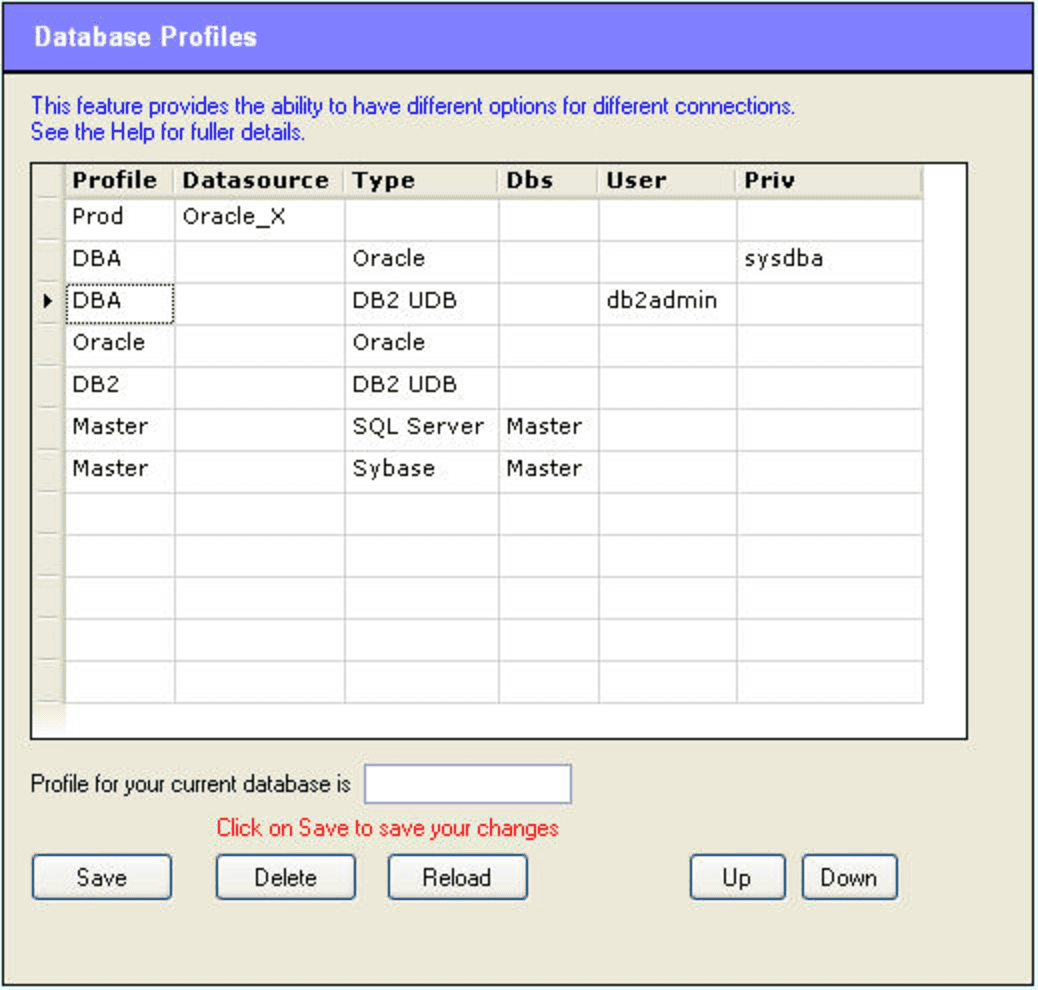
How this works
In the grid, you specify a number of rules.
when you sign onto a database, AQT will go through all the rules to see if the connection matches the specified criteria. If so, AQT will use that Profile for the connection
if a connection matches more than one entry, the first entry found will be the one used for the connection. Because of this, the order of the entries in the list is important.
you can have more than one rule for a particular Profile (in the above example, there are multiple rules for both DBA and Master). You would do this if there are multiple criteria for the profile.
if there is no rule for the connection, the connection will have no Profile. The connection will use the standard options.
In the list of entries:
Datasource is the name of the datasource. Use this if you want to use a profile for a particular database.
Type is the database type. Select this from the dropdown list. Use this if you want to use a profile for a particular database type.
Dbs is the Database Name. This is only used for databases where you can sign onto multiple databases within a server. This includes SQL Server, Sybase, Informix, SQL/MX and MySQL.
User is the userid you have signed onto the database with. Use this if you want to use a profile when you are signed onto a database with a particular userid.
Priv is the Oracle Privilege (sysdba or sysoper).
Example
In the above screenshot:
there are five profiles, Prod, DBA, Oracle, DB2 and Master.
Prod is used when signed onto datasource Oracle_X
DBA is used when signed onto any Oracle database as sysdba, except for Oracle_X, which is covered by the previous rule. It is also used when signed onto any DB2 database with userid db2admin
Oracle is used by any Oracle database that doesn't match the above two conditions
DB2 is used by any DB2/UDB database that doesn't match the above conditions
Master is used when signed onto a Master database within a SQL Server or Sybase server
Options for Profile
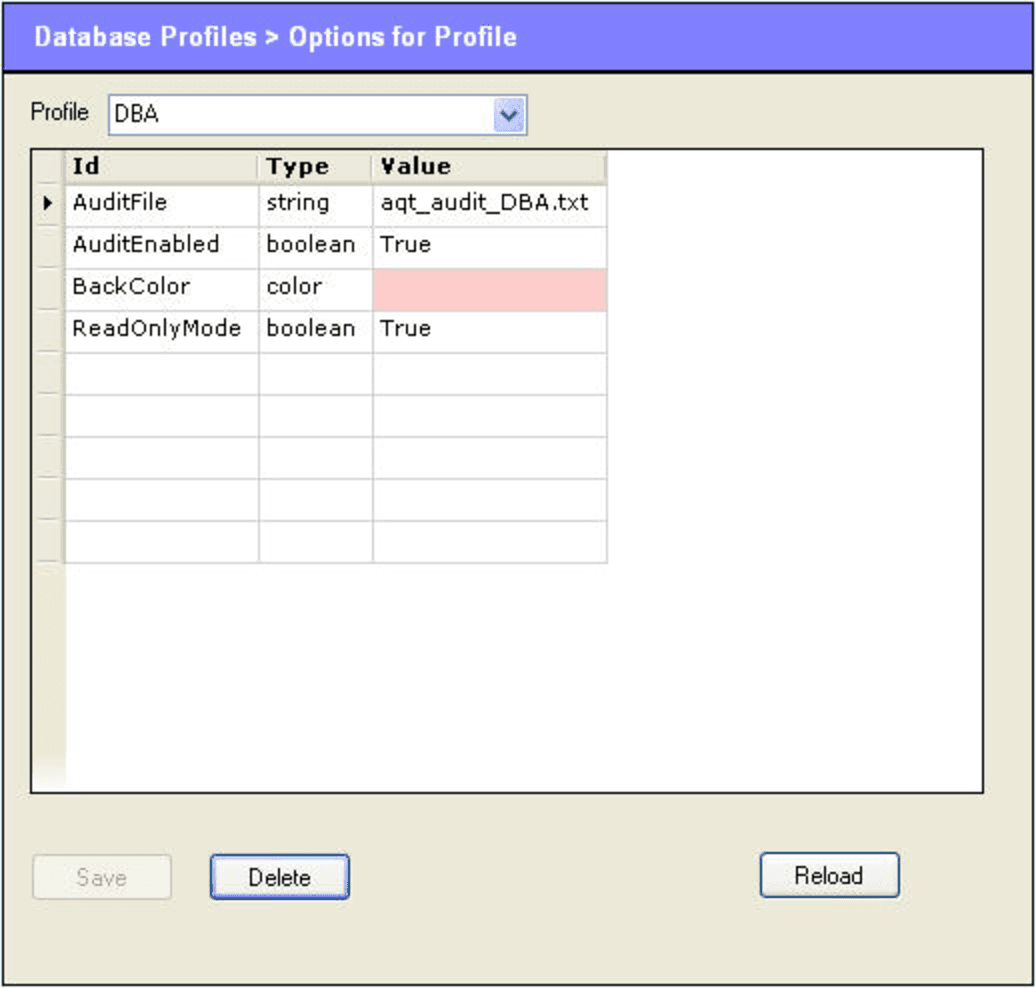
On this tab, you specify the options for the profiles. You only need to specify the options which are different to the standard options.
Select the Profile in the drop-down box at the top
In the Id field, select an option from the drop-down list. Option ids are discussed later.
the Type field will show you the type of the option. This will be one of string, boolean, color, number.
in the Value field, enter the value for the option. If you are selecting a color, a button Select Color button will appear beneath the grid.
After making some changes, you must click on Save to save the options for the profile. You should do this prior to changing to another profile; if not your changes will be lost.
Option Id
In the grid, options are identified by their internal option name. In many cases, it will be self-evident what option these corresponds to. For more on the internal name for options, see Technical Notes on Options.